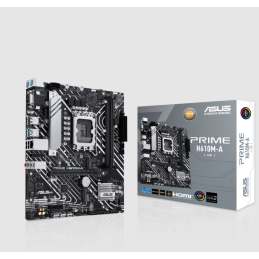
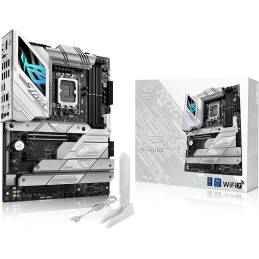
The ASUS Prime B760-PLUS is an ATX motherboard designed to deliver solid performance and advanced features for users looking to build systems based on the latest generation Intel processors. Below are its main specifications:
Technical Specifications
Socket and Compatible Processors:
Socket: LGA 1700.
Compatibility: Supports 14th, 13th and 12th generation Intel® Core™ processors.
Chipset:
Intel® B760.
Memory:
Slots: 4 x DDR5 DIMM.
Maximum Capacity: Up to 128 GB.
Speed: Supports frequencies up to 7200 MT/s (OC).
Storage:
M.2 Slots:
3 x M.2 (PCIe 4.0 x4) for high-speed NVMe storage devices.
SATA Ports: 4 x SATA 6Gb/s, supporting RAID 0, 1, 5, and 10 configurations.
Connectivity:
Network:
LAN: Realtek 2.5Gb Ethernet for a fast and stable network connection.
USB:
Back Panel:
1 x USB 3.2 Gen 2x2 Type-C®.
2 x USB 3.2 Gen 2 Type-A.
1 x USB 3.2 Gen 1 Type-A.
2 x USB 2.0 Type-A.
Internal Connectors:
1 x USB 3.2 Gen 1 connector (supports USB Type-C®).
1 x USB 3.2 Gen 1 header (supports 2 additional USB 3.2 Gen 1 ports).
2 x USB 2.0 headers (supports 4 additional USB 2.0 ports).
Audio:
Realtek High-Resolution Audio Codec with support for 7.1 channel surround sound.
Expansion Slots:
1 x PCIe 5.0 x16 for next-generation graphics cards.
1 x PCIe 4.0 x16 (supports x4 mode).
2 x PCIe 3.0 x1 for additional expansion cards.
ASUS
Video Outputs:
1 x DisplayPort.
1 x HDMI™.
1 x VGA.
Highlighted Features:
PCIe 5.0 Support: Ready for the next generation of high-speed graphics cards and devices.
Advanced Connectivity: Supports USB 3.2 Gen 2x2 Type-C® for fast and efficient data transfers.
Cooling Options: Includes VRM and M.2 heatsinks, plus hybrid fan headers, ensuring optimal heat dissipation.
RGB Lighting: Compatible with ASUS Aura Sync for custom lighting effects.
Form Factor:
ATX.
Considerations
Memory Compatibility:
It is recommended to check the memory compatibility list (QVL) provided by ASUS to ensure stability and optimal performance.
BIOS Update:
To ensure compatibility with the latest processors, it is recommended to update the BIOS to the latest available version.
Adequate Cooling:
Ensure proper ventilation in the case to maintain optimal operating temperatures.